Tuning
How to Set Amplifier Gain With a Multimeter
Researched from published physics, alignment relations and manufacturer specifications. Updated .
Quick answer
The gain knob on an amplifier is the single most misunderstood control in a car audio system. It looks like a volume knob, it sits next to the power and crossover controls, and almost every online forum treats it like a loudness dial you turn up until things sound wrong and then back off a little. None of that is what gain actually does, and treating it that way is the most common way an otherwise correct system ends up with a blown subwoofer, a fried tweeter, or an amplifier that runs hot for no obvious reason.
Gain is an input sensitivity control. It sets how much the amplifier boosts the voltage arriving from the head unit or processor so that, at the source's maximum clean output, the amp produces its full rated power without clipping. Setting it correctly takes a multimeter, a test tone, and a few minutes, and it removes the guesswork entirely. This guide walks through the math, the setup, and the exact procedure, along with the tools that make it repeatable.
Is amplifier gain a volume control?
No, and this is the point where most gain-setting mistakes start. A volume control changes the actual loudness of what you hear. A gain control changes how sensitive the amplifier's input stage is to the voltage coming in from the head unit or a signal processor. Every source has its own maximum clean output voltage before its own internal circuitry starts to distort. Gain exists to match that specific source's maximum voltage to the specific amplifier's full-power input requirement, so that when the source is at the top of its clean range, the amp is at full rated power and not one volt past it.
Because that matching point is different for every head unit, every processor, and every amplifier channel, there is no universal gain knob position that works across systems. A gain set correctly for one head unit can be wildly wrong on a different one, even if the amplifier and speakers never change. That is why gain has to be set with a meter against the actual source in the actual car, not copied from a forum post about someone else's setup.
What voltage should the meter read?
The relationship comes straight from Ohm's law applied to power: P equals V squared divided by R, which rearranges to V equals the square root of P times R. Plug in the amplifier channel's rated RMS power and the nominal impedance of the load it is driving, and the result is the AC voltage the meter should read at full, clean output. This is a published relationship, not a convention, so it is worth doing the arithmetic for your own amp and load rather than borrowing someone else's number.
| RMS Power | Load Impedance | Target AC Voltage |
|---|---|---|
| 200 watts | 4 ohms | 28.3 V |
| 300 watts | 4 ohms | 34.6 V |
| 500 watts | 2 ohms | 31.6 V |
| 1,000 watts | 1 ohm | 31.6 V |
Published figure Source: V = sqrt(P x R), from P = V^2 / R. Use the channel's actual RMS rating and the actual impedance the amp sees, not the speaker's nominal figure alone if it has been wired to a different load.
Setup before you touch the gain knob
The setup matters as much as the meter reading. Play a 50 or 60 Hz sine wave test tone, not music, because a steady sine tone gives a stable voltage the meter can actually settle on, and a low frequency matches the bass content a subwoofer amp will actually be asked to reproduce at full power. Set the head unit or source volume to about three quarters of its maximum, not all the way up, because many head units introduce their own internal distortion in the last portion of their volume range and you do not want to set gain against a source that is already clipping.
Every equalizer band, loudness setting, and bass boost has to be completely flat and off during this process. If bass boost is engaged while setting gain, the gain gets set for a boosted signal, and the moment bass boost is turned off during normal listening the system loses headroom in the wrong direction; if it stays on, the amplifier clips on real music that adds bass boost on top of an already correctly matched gain. Flat EQ during setup, then adjust EQ afterward, is the only sequence that keeps the math honest.
Step by step: setting gain with a multimeter
- Calculate the target voltage for the channel using V = sqrt(P x R) with the amp's RMS rating and the load impedance.
- Turn the gain all the way down, set every EQ band and bass boost flat, and disconnect or mute any other channels feeding the same amplifier if possible.
- Play a 50 or 60 Hz test tone from the source at about three quarters volume.
- Connect the true RMS multimeter's leads directly across the speaker output terminals for that channel, set to AC voltage.
- Slowly raise the gain while watching the meter, and stop the instant the reading reaches the calculated target voltage.
- Repeat for every channel independently, since a front stage amp and a subwoofer amp will almost never share the same target voltage.
Once every channel is set this way, the amplifier is producing its full rated power at the source's maximum clean output and no further, which is exactly the point of the control.
Why a true RMS meter matters
Use a true RMS meter, not an average-responding one. Many inexpensive multimeters are average-responding and misread a low frequency sine wave, and the error direction depends on the specific meter. A meter that reads high causes you to set the gain lower than it should be, which costs some output but is the safe direction. A meter that reads inaccurately in the other direction can push gain past the true clipping point without the meter showing it. A true RMS meter removes that uncertainty and is worth the modest cost difference for anyone setting gain more than once.
Why not just set gain by ear?
Setting gain by ear means turning the volume up until the sound starts to break up or the speaker starts to sound harsh, then backing off a little. It feels intuitive, and it is folklore rather than a method, for two reasons. First, human hearing fatigues quickly at loud volumes, so the exact point where distortion becomes audible keeps moving the longer you listen, and it is different for every listener and every set of ears on a given day. Second, by the time clipping is audible as harshness, the amplifier has often been clipping for a while already at a level below where a person can reliably detect it, especially with a subwoofer producing frequencies that are already hard to judge for cleanliness by ear.
Clipping, not high power itself, is what damages voice coils. A clipped waveform has a flattened top that dumps sustained DC-like energy into the coil instead of the normal push-pull of a clean signal, and that sustained energy is what overheats and unwinds the coil. A gain set by voltage measurement never has to guess where that line is, because it is calculated in advance and confirmed with a meter rather than discovered by listening for the amplifier to already be doing damage.
What you need

AstroAI true RMS multimeter
$34.99A true RMS meter at an affordable price, accurate enough for setting gain on a sine tone without the misreads a cheap average-responding meter can produce.
Check price on Amazon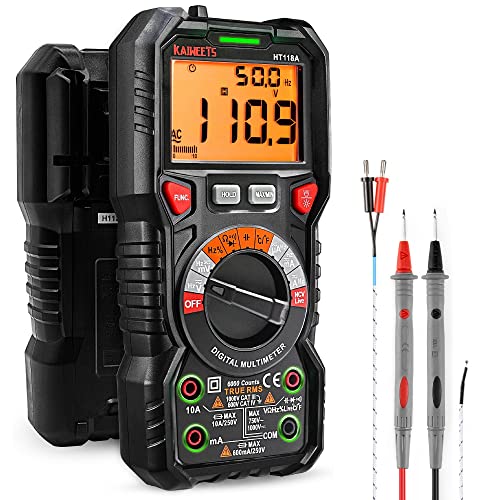
KAIWEETS automotive true RMS
$37.99An automotive-focused true RMS meter with leads suited to working around a car's electrical system while setting gain or checking grounds.
Check price on Amazon
Fluke 17B+ multimeter
$129.74A step up in build quality and accuracy for anyone setting gain professionally or across many vehicles where a meter needs to hold calibration over time.
Check price on AmazonFrequently asked questions
- Can I set gain with a smartphone SPL app instead of a multimeter?
- No. An SPL app measures sound pressure through the phone's microphone, which is affected by the car's cabin acoustics, mic placement, and background noise. Gain is a voltage matching problem between the source and the amplifier's input stage, and only a meter reading the actual output voltage across the speaker terminals gives you the number the calculation calls for.
- What test tone frequency should I use to set subwoofer gain?
- A 50 or 60 Hz sine wave is standard because it sits inside the range a subwoofer actually reproduces at full power and gives the meter a stable, steady voltage to settle on. Music has changing frequency content and level, so a meter reading during a song bounces around and never reflects a clean, repeatable maximum.
- Should the head unit be at maximum volume when I set gain?
- No, use about three quarters of maximum volume. Many head units introduce their own internal distortion in the top portion of their volume range, so setting gain against a source that is already clipping bakes that distortion into every listening session. Three quarters volume leaves the source clean while still representing a realistic loud listening level.
- Do I need to reset the gain if I install a new subwoofer or amplifier?
- Yes. The target voltage depends on the amplifier channel's specific RMS power rating and the impedance of the load it sees, and both of those change with a new subwoofer or amplifier. Recalculate V = sqrt(P x R) for the new combination and reset the gain rather than reusing the old setting.
- What if my multimeter is not true RMS?
- A non-true-RMS meter can misread a low frequency sine wave in either direction depending on the model. If it reads high, you end up setting gain conservatively low, which is the safer outcome but leaves usable power on the table. Because the error direction is not guaranteed, a true RMS meter is worth using whenever gain is being set precisely.
- Can bass boost be left on while setting gain?
- No, bass boost and every EQ band should be completely flat during the process. Bass boost is a fixed equalizer boost at a specific frequency, and setting gain with it engaged sets the amplifier up to clip the instant real bass-heavy content plays, since the boosted signal adds on top of a gain that is already at its calculated maximum.
Researched guidance, not professional advice. Every head unit, amplifier, and vehicle electrical system behaves a little differently, and a professional installer with a scope can catch things a multimeter alone cannot. If a system still sounds wrong after gain is set correctly, have it checked rather than compensating with more gain.